
入门指南Getting Started
从第一次打开,到在真实工作场景里稳定使用。建议按这页顺序走一遍。 From first launch to stable everyday use. Follow this page in order the first time.
第一次打开先做三件事Do these three things first
Echo 的核心路径很短:授权、确认本地模型、设置一个不会冲突的快捷键。完成后,你就可以在任意可输入文字的位置直接说话。 Echo has a short setup path: grant permissions, confirm the local model, and choose a shortcut that does not conflict with other apps.
- 打开 Echo,按提示授予麦克风、辅助功能和输入监控权限。Open Echo and grant Microphone, Accessibility, and Input Monitoring permissions.
- 确认本地模型已经就绪。没有模型时,可以在 App 内下载官方模型或导入已有模型。Confirm the local model is ready. If it is missing, download the official model or import an existing one.
- 确认触发方式。默认快速输入键是右 Command,默认 AI 指令键是右 Control;你也可以录制 Option + Space 或其它组合键。Confirm your triggers. Right Command is the default fast dictation key, Right Control is the default AI command key, and you can record Option + Space or another shortcut.
授权、模型就绪和快捷键确认完成后,就可以在任意输入框使用 Echo。 Once permissions, the local model, and shortcuts are ready, you can use Echo in any text field.
第一次授权First permissions
macOS 会把语音输入相关能力拆成几个系统权限。Echo 需要它们来完成录音、全局快捷键监听和把文字放回当前输入框。 macOS separates voice input into several system permissions. Echo needs them to record audio, listen for shortcuts, and insert text into the active field.
- 麦克风:Microphone: 用于录音和识别。records your speech for recognition.
- 辅助功能:Accessibility: 用于把文字注入当前输入框。lets Echo insert text into the active field.
- 输入监控:Input Monitoring: 用于更稳定地监听全局快捷键,尤其是按住说话。helps global shortcuts work reliably, especially hold-to-talk.
第一次语音输入Your first dictation
打开一个你平时会输入文字的 App,例如微信、飞书、备忘录、邮件或浏览器搜索框。点击输入框,让光标停在里面,然后按下快捷键开始说话。 Open an app where you normally type, such as Messages, Feishu, Notes, Mail, or a browser search box. Click the text field, then press your shortcut.
第一次建议说一句短话,比如“明天上午十点我们再同步一下项目进展”。确认能正常输入后,再尝试更长的句子。 For the first test, say a short sentence. After insertion works, try longer sentences and real messages.
短按与长按快捷键Shortcut modes
当前默认设置里,右 Command 用于快速输入,右 Control 用于 AI 指令。两个键分开后,普通输入可以保持本地极速,AI 任务则由右 Control 明确触发。 By default, Right Command is for fast dictation and Right Control is for AI commands. Keeping them separate keeps normal input fast and local.
短按:开始和结束Tap: start and stop
短按模式适合较长的表达。按一次开始录音,说完后再按一次结束,Echo 会转写并输入结果。 Tap mode is better for longer thoughts. Press once to start, press again to stop, and Echo inserts the transcript.
长按:按住说话Hold: push to talk
长按模式适合聊天和客服回复。按住快捷键时录音,松开后提交。它很快,但对输入监控权限更敏感。 Hold mode is ideal for chat and support replies. Hold the shortcut to record, release to submit. It is fast but depends more on Input Monitoring.
Esc 取消输入Esc cancels input
录音、识别或处理过程中,如果发现说错了、按错了键,直接按 Esc 可以取消本次输入。Echo 会停止录音和处理,不会把这次内容插入到当前输入框。 During recording, recognition, or processing, press Esc to cancel the current input. Echo stops the session and does not insert this attempt into the active field.
AI 指令键AI command key
AI 指令键默认是右 Control。它和快速输入键分开:右 Command 仍然走本地识别,不会自动调用云端;只有你按右 Control 并说出修改、问答、翻译、剪贴板处理或看屏幕需求时,Echo 才会启动 AI 流程。 The AI command key defaults to Right Control. It is separate from fast dictation: Right Command stays local, and Echo only starts AI when you press Right Control and ask for editing, answering, translation, clipboard processing, or screen context.
- 选中文本后按 AI 指令键:适合改写、润色、翻译、总结选区。With text selected: rewrite, polish, translate, or summarize the selection.
- 未选中文本时按 AI 指令键:适合整理长语音、写回复、问问题。With no selection: structure long speech, draft replies, or ask questions.
- 说“看当前窗口 / 总结这个页面”:触发屏幕可见文字识别。Say “look at the current window” or “summarize this page” to use visible screen text.
AI 翻译AI translation
翻译由 AI 指令键触发,支持单次翻译、选区翻译和持续翻译。单次翻译把目标语言和内容直接说在同一句里;只有持续翻译会进入长期状态。 Translation is triggered by the AI command key. Echo supports one-off translation, selected-text translation, and continuous translation. One-off translation includes the target language and source text in one command; only continuous translation stays active.
单句翻译Translate one sentence
按右 Control 后直接说:“把明天见翻译成日语”。Echo 会把这句话翻译后写入当前位置,或在结果较长时打开结果窗口。这是一轮完成,不需要再按一次快捷键。 Press Right Control and say: “translate see you tomorrow to Japanese.” Echo writes the translation into the current field, or opens the result window for longer output. This finishes in one turn; you do not press the shortcut again.
一次翻译长内容Translate longer text once
内容较长时,也直接在同一轮里说完,例如:“把下面这段话翻译成英文,我要说的内容是……”。Echo 会把后面的内容作为原文翻译;本次完成后自动恢复普通 AI 指令,不进入持续翻译。 For longer text, still say it in the same turn, for example: “translate the following into English: ...”. Echo treats the following content as the source text, then returns to normal AI commands after this one translation.
持续翻译Continuous translation
按右 Control 说:“接下来都翻译成英文”。之后进入持续翻译状态,后续输入会按这个目标语言输出。要退出时说“结束翻译 / 停止翻译 / 取消翻译”。 Press Right Control and say: “translate everything next into English.” Echo enters continuous translation mode, and later input is output in that target language until you say “stop translation.”
搜索后回答Search-backed answers
未选中文本时,以“请问 / 问一下”开头提问,Echo 会先判断是否需要实时资料。需要时,它可以使用你配置的搜索能力补充信息,再把答案放在结果窗口中。 When no text is selected, start with an ask-style prompt. Echo decides whether fresh information is useful and can use your configured search capability before showing the answer.
AI 看屏幕Screen context
当你明确说“看当前窗口 / 总结这个页面 / 看屏幕帮我回复”时,Echo 会截取当前窗口,并在本地识别可见文字,然后把文字上下文交给 AI。它不会在普通快速输入时自动读取屏幕。 When you explicitly ask Echo to look at the current window or summarize the page, it captures the current window, recognizes visible text locally, and passes that text context to AI. Normal fast dictation does not read the screen.
这个能力需要屏幕录制权限。你可以在设置里关闭“AI 看屏幕”,需要时再开启。 This feature requires Screen Recording permission. You can keep screen context off and enable it only when needed.
剪贴板处理Clipboard processing
当你明确提到“剪贴板 / 刚复制的内容 / 复制内容”时,Echo 会处理当前剪贴板文本。适合把网页、邮件或文档里复制的内容整理成要点、回复或摘要。 When you explicitly mention clipboard or copied content, Echo processes the current clipboard text. Use it to turn copied web, email, or document text into bullets, replies, or summaries.
术语词典Dictionary
如果你经常说产品名、人名、技术词或中英混合表达,建议把它们加入个人术语词典。词典会参与本地后处理,让输出更贴近你的真实写法。 If you often use product names, names, technical terms, or mixed Chinese-English speech, add them to your personal dictionary. Echo uses it during local cleanup.
Pro 工作套件Pro work suites
工作套件是 Pro 的核心能力之一。它把常用场景规则和官方模板按职业组织好,你不需要每次从空白提示词开始配置。 Work suites are a core Pro feature. They package app rules and official templates by work type, so you do not start from a blank prompt every time.
- 程序员套件:Developer Suite: 适合 Codex、Claude、Cursor、Terminal、Bug 描述和 Commit Message。for Codex, Claude, Cursor, terminal dictation, bug reports, and commit messages.
- 办公套件:Office Suite: 适合邮件、周报、会议纪要、飞书文档和正式沟通。for email, weekly reports, meeting notes, work docs, and formal communication.
- 创作者套件:Creator Suite: 适合口播稿、标题改写、内容大纲和社媒草稿。for scripts, title rewrites, content outlines, and social drafts.
- 产品经理套件:Product Suite: 适合需求描述、用户反馈、PRD 片段和版本说明。for requirement briefs, user feedback, PRD snippets, and release notes.
- 销售客服套件:Sales & Support Suite: 适合客户回复、跟进记录、异议处理和通话小结。for customer replies, follow-ups, objection handling, and call summaries.
- 学习研究套件:Study & Research Suite: 适合阅读笔记、概念卡片、资料摘要和复习提纲。for reading notes, concept cards, source summaries, and study outlines.
场景适配规则App-aware rules
Pro 可以按当前 App 自动选择处理方式。录音开始时 Echo 会识别目标 App,命中已启用规则后,自动选择对应的整理方式;没有命中时继续跟随全局设置。 Pro can choose the cleanup behavior by current app. Echo detects the target app at recording start, applies the enabled matching rule, and falls back to global settings when nothing matches.
- 聊天:保留自然语气,不把消息写成正式文档。Chat: keeps messages natural instead of document-like.
- 邮件:更正式、更清楚,适合对外沟通。Mail: clearer and more formal for external communication.
- 文档和笔记:整理成段落、要点、待办或结构化说明。Documents and notes: paragraphs, bullets, action items, or structured notes.
- 代码和 AI 编程:保守纠错,保护命令、路径、变量和代码片段。Code and AI coding: conservative cleanup that preserves commands, paths, variables, and snippets.
模型配置Model setup
Echo 里和模型有关的配置可以分成三层:本地语音识别模型负责快速输入,云端语音模型用于你主动配置的服务商能力,AI 模型负责搜索后回答、看屏幕、改写和总结。建议先把本地识别跑通,再逐步开启云端和 AI。 Model setup in Echo has three layers: local speech recognition for fast dictation, cloud speech models for provider-specific features you enable, and AI models for search-backed answers, screen context, rewriting, and summarization. Start with local recognition, then add cloud and AI features.
1. 先确认本地识别模型1. Confirm the local recognition model
- 打开 Echo 设置页,进入模型或本地引擎相关区域。Open Echo Settings and go to the model or local engine section.
- 如果显示模型未就绪,优先点击下载官方模型;如果你已经有模型目录,选择导入已有模型。If the model is not ready, download the official model first. If you already have a model folder, import it.
- 状态显示可用后,回到任意输入框,用右 Command 做一次短句测试。When the status is ready, return to any text field and test a short sentence with Right Command.
2. 获取豆包语音新版 API Key2. Get the new Doubao Speech API key
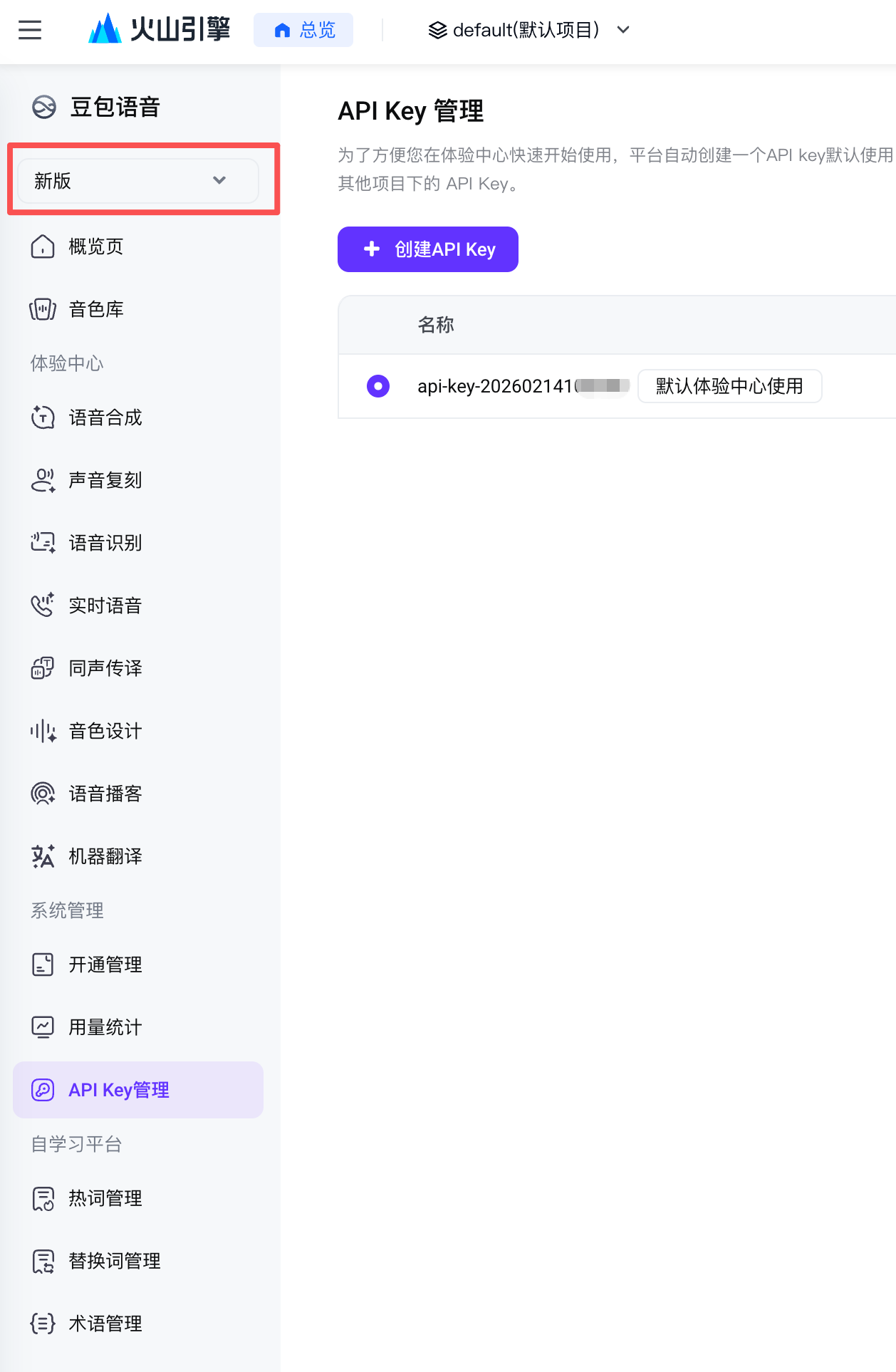
新版 API Key 获取地址: New API key page: console.volcengine.com/speech/new/setting/apikeys 。打开后确认左上角显示“新版”,在 API Key 管理页点击“创建 API Key”,再把生成的 Key 填入 Echo 对应的豆包语音配置里。 . After opening it, confirm the top-left selector says “New”, create an API key on the API Key Management page, then paste it into Echo's Doubao Speech configuration.
3. 需要旧版时,切换到旧版模型3. Switch to the legacy model when needed
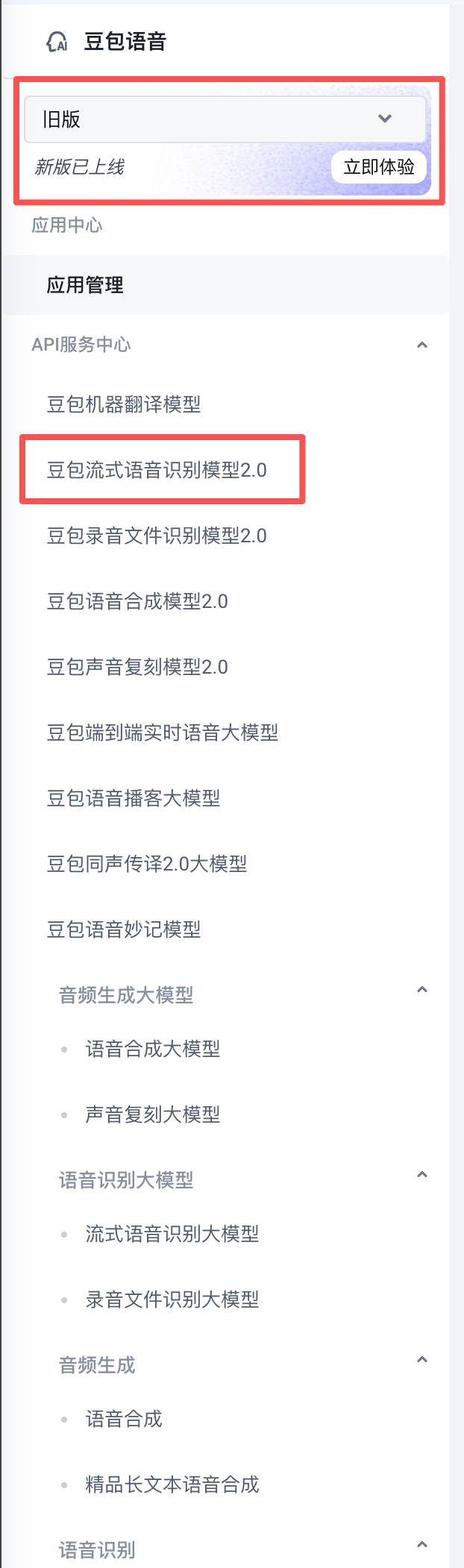
如果你的 Echo 配置仍然使用旧版豆包语音模型,打开火山引擎页面后,点击左上角版本下拉,切换到“旧版”。进入旧版后,在 API 服务中心选择“豆包流式语音识别模型2.0”,再按旧版控制台要求完成开通和密钥配置。 If your Echo setup still uses the legacy Doubao Speech model, open the Volcengine page, use the top-left version selector, and switch to “Legacy”. In the legacy console, choose “Doubao Streaming Speech Recognition Model 2.0” in the API service center, then complete activation and key setup there.
4. 配置 AI 和搜索能力4. Configure AI and search features
AI 指令键、搜索后回答和 AI 看屏幕依赖你在 Echo 中配置的 AI 服务。配置时先填写模型服务商的 Base URL、API Key 和模型名称,再按需开启搜索服务与屏幕上下文。建议用一条简单问题测试搜索后回答,再用当前窗口摘要测试看屏幕能力。 The AI command key, search-backed answers, and screen context depend on the AI provider configured in Echo. Enter the provider Base URL, API key, and model name first, then enable search and screen context as needed. Test with a simple search-backed question, then summarize the current window to verify screen context.
如果你需要单独配置搜索 API,推荐使用 If you do need a separate search API, we recommend Tavily 。Tavily 通常提供每月 1000 次搜索额度,实际次数、计费和限制以平台当时规定为准。 . Tavily commonly provides 1,000 searches per month; the actual quota, billing, and limits depend on Tavily's current platform rules.
本地模型Local models
Echo 优先使用本地 SenseVoice Small。模型可以随 App 包同步,也可以从官方源下载,还可以导入你已经准备好的模型目录。 Echo prioritizes the local SenseVoice Small model. It can sync a bundled model, download the official model, or import a model folder you already have.
- 如果 App 显示模型未就绪,先点击下载官方模型。If Echo says the model is not ready, try downloading the official model first.
- 如果你已经有模型,使用导入已有模型。If you already have the model, use the import option.
- 如果下载被网络阻断,稍后重试或改用手动导入。If the download is blocked, retry later or import manually.
云端补强Cloud correction
云端补强不是默认必需功能。你可以关闭它,也可以设置为低置信度时才使用,或使用保守补强模式。 Cloud correction is not required by default. You can keep it off, use it only for low-confidence output, or enable conservative correction.
设置页Settings
设置页会按快捷键、麦克风、系统、AI 和关于分区。建议先确认快捷键和麦克风,再进入 AI 相关配置。 Settings are organized into Shortcut, Microphone, System, AI, and About sections. Start with shortcuts and microphone before configuring AI options.
不能输入怎么办Input troubleshooting
- 确认当前输入框已经获得光标焦点。Confirm the current text field has focus.
- 检查辅助功能权限是否仍然开启。Check that Accessibility permission is still enabled.
- 换一个简单 App 测试,例如备忘录。Test in a simple app such as Notes.
- 如果只在某个 App 失败,可能是该 App 拦截了输入事件。If only one app fails, that app may be intercepting input events.
AI 指令键没有反应AI key does not respond
- 确认默认 AI 指令键是右 Control,或到设置页查看你是否改成了其它快捷键。Confirm the default AI key is Right Control, or check settings if you changed it.
- 确认 AI 功能已经开启,并且模型服务商的 Base URL、API Key 和模型名可用。Confirm AI is enabled and your provider Base URL, API key, and model name are valid.
- 如果你在按住说话模式下使用单独修饰键,确认输入监控权限仍然开启。If you use hold-to-talk with a modifier key, confirm Input Monitoring is still enabled.
看屏幕不可用Screen context does not work
- 确认设置里已经开启“允许看当前窗口”。Confirm “Allow Window Reading” is enabled in settings.
- 确认 macOS 屏幕录制权限已授予 Echo,授权后建议重启 App。Confirm macOS Screen Recording permission is granted to Echo, then restart the app.
- 请明确说“看当前窗口 / 总结这个页面 / 看屏幕帮我回复”,普通快速输入不会自动读取屏幕。Ask explicitly to read the current window or summarize the page. Fast dictation does not read the screen automatically.
翻译状态没有退出Translation mode is still active
持续翻译还在生效时,按右 Control 说“结束翻译 / 停止翻译 / 取消翻译”。普通单次翻译完成后不会保持翻译状态。 If continuous translation is still active, press Right Control and say “stop translation.” Normal one-off translation does not keep translation mode active after it finishes.
不同 App 输出效果不一样Output differs by app
如果你开启了 Pro 工作套件或场景适配规则,这是正常现象。Echo 会根据当前 App 自动选择聊天、邮件、文档、代码等规则。你可以在设置里的“自动适配规则”中关闭某个规则或改回跟随全局。 If Pro work suites or app-aware rules are enabled, this is expected. Echo adapts output by current app. Disable or adjust a rule in Auto Rules if needed.
麦克风没有声音No microphone sound
先检查系统输入设备是否正确,再回到Echo 设置页选择“跟随系统输入设备”。如果你固定了某个麦克风,设备拔出后可能会临时回退系统默认输入。 Check the macOS input device first, then choose “follow system input device” in Echo. If you pinned a microphone and unplug it, Echo may temporarily fall back to the system default.
模型下载失败Model download failed
模型文件较大,下载失败通常和网络、磁盘空间或权限有关。你可以重试下载、换网络,或把已有模型导入到 App 支持目录。 Model files are large. Download failures are usually caused by network issues, disk space, or permissions. Retry, switch networks, or import an existing model folder.